


Glass themes for Shiny, built on bslib. Add translucent surfaces, live light/dark switching, and adjustable glass intensity to your app.
Documentation · Theming guide · Release notes

Playwright checks phone-sized viewports (393x852 and 390x852, with touch). On a coarse pointer, the controls those tests measure are at least 44px, including the sidebar toggle and popover triggers. A popover closes on a second tap and on a tap outside. The Harbor notes sidebar toggle and close button both respond. Harbor notes does not scroll sideways at 393x852 or 390x844, and neither do the 480px dashboard and Olympics fixtures. The sources offcanvas opens and closes from its own buttons.

On an existing bslib page, pass glass_theme() as
theme and observe the controls:
library(shiny)
library(bslib)
library(shinyglass)

ui <- page_sidebar(
  title = "Existing app",
  theme = glass_theme(preset = "auto", intensity = 0.5),
  sidebar = sidebar(
    glass_theme_toggle(),
    glass_intensity_slider()
  ),
  "Main column"
)

server <- function(input, output, session) {
  observe_glass(input, session)
}

shinyApp(ui, server)
glass_page() is the same idea in one call. It includes
Light / Dark / Auto, the intensity slider, and accent wells. Intensity
runs from 0 (Ultra Clear) to 1 (Tinted). The
default is 0.5. Do not pass
material = "clear"; that argument is deprecated.
ui <- glass_page(
  title = "Hello, glass",
  sliderInput("n", "Bars", 5, 30, 15),
  plotOutput("plot")
)

server <- function(input, output, session) {
  observe_glass(input, session)
  output$plot <- renderPlot({
    pal <- glass_plot_colors(input = input)
    barplot(seq_len(input$n), col = pal$fill, border = NA, col.axis = pal$ink)
  }, bg = "transparent")
}

shinyApp(ui, server)
The installed package has the full recipe (options, the 0.5.0
migration, and pitfalls): ?shinyglass and
vignette("shinyglass").


Harbor notes is the flagship demo: a shinychat window on the dusk
wallpaper, with a floating composer, a scripted reply (thinking, a
citation, and a tide-table tool card), and an offcanvas sources panel.
Open
Harbor notes. The hosted app answers with Gemini Flash and falls
back to a local script if the API errors. The same app is in
inst/examples/shinychat-glass.
CRAN 0.5.0:
install.packages("shinyglass")Development builds (GitHub):
# install.packages("remotes")
remotes::install_github("ericrayanderson/shinyglass")library(shiny)
library(shinyglass)
ui <- glass_page(
title = "Hello, glass",
persist = TRUE,
scene = "tahoe",
sliderInput("n", "Bars", 5, 30, 15),
plotOutput("plot")
)
server <- function(input, output, session) {
observe_glass(input, session)
output$plot <- renderPlot({
pal <- glass_plot_colors(input = input)
barplot(seq_len(input$n), col = pal$fill, border = NA, col.axis = pal$ink)
}, bg = "transparent")
}
shinyApp(ui, server)glass_page() includes Light / Dark / Auto, the intensity
slider, and accent wells. Set persist = TRUE (the default
here) to remember those choices.
The intensity slider mirrors iOS 27 Settings → Appearance →
Liquid Glass (continuous Ultra Clear → Tinted). The default is
0.5, Apple’s midpoint. Browsers cannot read that OS slider,
so the in-app control is the supported way to match the look. Reduce
Transparency paints solid fills with no backdrop blur. Increase Contrast
and forced colors override the glass variables.
Defaults also follow iOS 27 as far as a browser can. Chromium
refracts the backdrop through a squircle lens. Safari and Firefox keep
blur and tint. Active pills and tabs spring into each other, buttons
press with a short spring, and floating bars pick up a scroll-edge fade.
Tab bars shrink while you scroll down. Specular highlights are static
(no pointer tilt). Icons in bars and non-primary buttons are monochrome
clear glass (icon_style = "clear"). Pass
icon_style = "color" to keep author colors. The detached
sidebar is opt-in: floating_sidebar = TRUE.
Dense charts and tables can opt into a regular panel with
glass_theme(plot_surface = "opaque") while nav and controls
stay on glass. The default "clear" look still shows the
wallpaper through plot hosts. Use
glass_plot_surface_input() to toggle live (ggplot / plotly
/ gt / DT).
Named wallpaper scenes (tahoe, dusk,
mesh, aurora, harbor,
grove) and optional wallpaper= photos stay
behind a blur + wash so text meets the contrast floor. For chromote,
PDF, or screenshots, call glass_flatten() or open the app
with ?glass_flatten=1.
Power users can read glass_css_tokens() and override
--glass-* variables with
glass_theme(tokens = list(blur = "28px")) without forking
SCSS.
Apps may take a moment to wake up.
Try it on your phone, or press Phone view on a desktop.
| Demo | Explore |
|---|---|
| Harbor notes | Flagship chat on Liquid Glass |
| Basics | Theme switching and core controls |
| Dashboard | Cards, plots, and tables |
| Inputs | Shiny input controls |
| Olympic medals | A complete dashboard |
These five are the hosted set. plotly + gt stays a local example in
inst/examples/plotly-gt-demo.R.
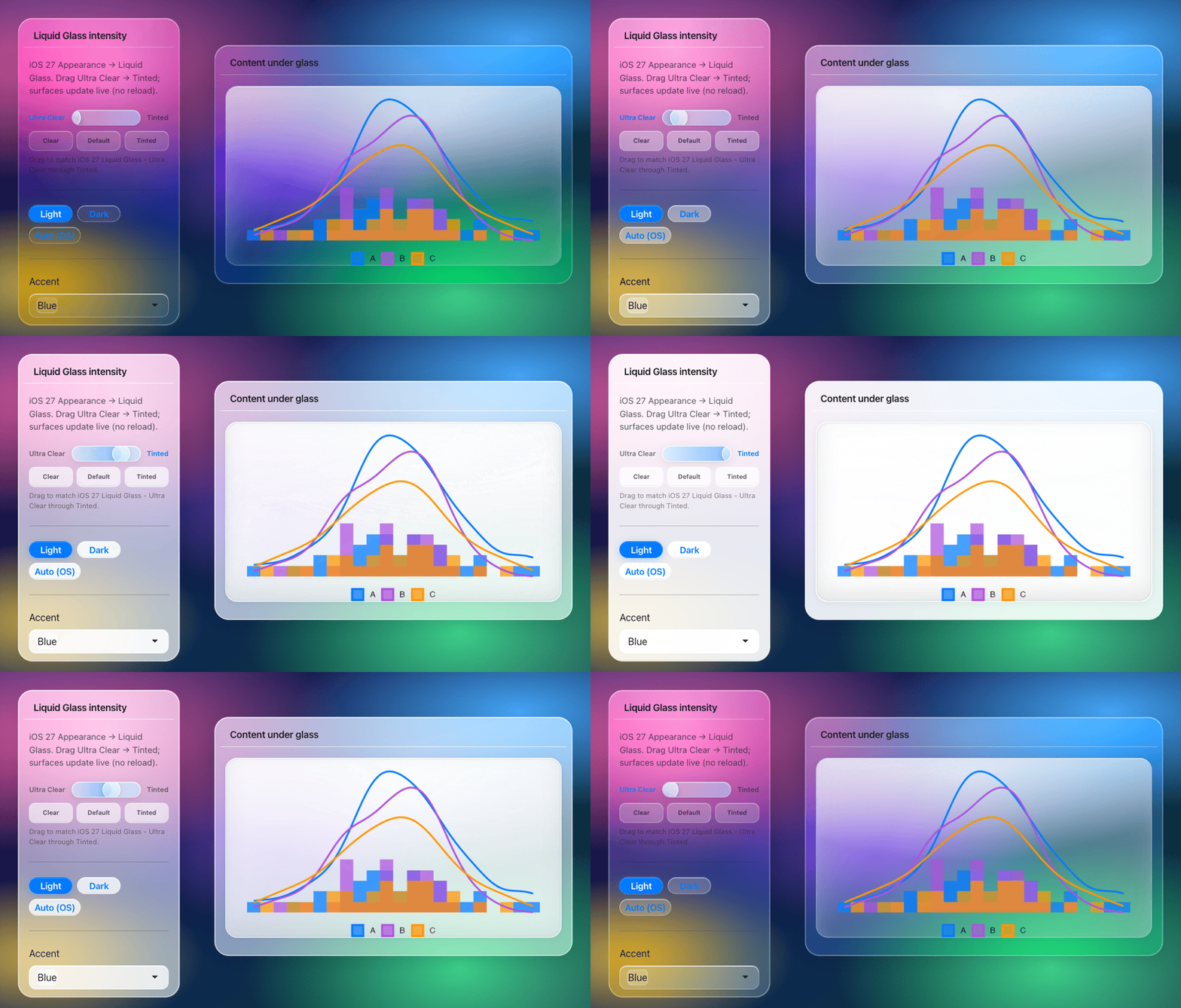
The intensity slider still runs from Ultra Clear to Tinted. The
default is 0.5.
Built for Bootstrap 5 and bslib. See compatibility for supported widgets and older layouts.
More: examples · experimental Python package · testing · deployment